Handling Media and other File Data

For over forty years there has been an on-going debate about the relative merits of supporting persistent storage of data in database management systems versus file systems.

The database people think that all information should be stored and accessed using a DBMS.  The File system people think taht the DBMS people are wrong -- or worse -- and taht DBMS should b e used for special purposes and that bulk data should be stored in a file system.

They DBMS people were clearly wrong for the first twenty or thirty years.  But as systems become larger and more powerful and as DBMS systems become more efficient and robust, the right position is not so clear.

From my perspective, particularly with respect to Web-based systems, I believe it still makes sense to store bulk data in the file system while using the DBMS for information about the data as well as information about relationships among data items.  The discussion that follows is based on that perspective.


Architecture

Uploading media and other file data is most likey to be done within the context of HTTP and HTML -- that is from an HTML form whose data is handled is handled in the doPost method of a Servlet.  The discussion below will assume the following architecture:


As you can see, this architecture reflects the basic Model - View - Controller architecture:
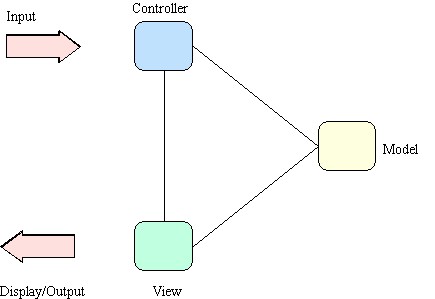


Client Side

On the client side, the user interface is provided by a conventional HTML page that includes an HTML Form element.  A basic strategy that is often followed is to include fields in the form that allow a user to provide information about the data to be uploaded as well as a browsing facility that allows the user to look for and sesignate the file to be uploaded.

To define such a form requires two things:  designation that the data is multipart and inclusion of a special file element.

Multipart Form

<form ENCTYPE="multipart/form-data" action="/ooc/UIServlet" method="post">

// various form components

</form>

For additional details, see the following references:

Form Element

<input type="file" name="fileUpLoad">

 This element instructs the browser to include a file browser component within the form.

Server Side

There are several key issues for handling file upload data on the server side.  In this context, Servlets will provide the program context in which form data is received and it will be processed in a doPost method.  One important reason for this is that file data can be quite large and you would not want to have HTTP carry it as part of the URL as would be the case for doGet.

While it would be desirable in some systems to handle the file data in lower levels of the architecture, it is most practical to handle it close to the front of the servlet since it is accessed through the HttpServletReqest parameter.

Data is assumed to arrive at the Servlet by coming from a WWW browser, more specifically from an HTML form that produces Multipart Form data.  Whereas one could write tools to handle that data directly, it is most easily done by using some existing package developed for that purpose.  The one used here comes from O'Reilly and is called MultipartParser.

In the architecture shown above, an instance of a MultipartParser wuld be created in a servlet method.  It would use the HttpServletRequest parameter, and write the uploaded file directly to the file system.

Subsequent processing would be required to then entire information associated with the file into the DBMS.

Package

The O'Reilly MulitpartParser is an excellent tool for working with uploaded file data on the server side.  Local documentation can be found here: Multipart Parser.  

Tools to work with include the following:

  • MultipartParser
  • readNextPart();
  • Part
  • isParam();
  • getName();
  • getStringValue();
  • isFile();
  • getFileName();
  • getContentType();
  • writeTo( File );

Processing Form Data

com.oreilly.servlet.multipart.MultipartParser mp;
com.oreilly.servlet.multipart.Part part;

boolean more = true;  // process file write
while ( more ) {		
part = mp.readNextPart();
if ( part == null )  more = false;		
else  {
    if ( part.isParam() ) {  // builds user params from form					
        name = part.getName();
        value = ((ParamPart)part).getStringValue();
        bean.setUserParam( name, value );
    }
    else {  // builds sys params and user params derived from file

        . . . // do something, using part: e.g., build filePathAndName 

        name = "size";
        long size = writeFile( part, filePathAndName );  // ACTUAL WRITE, using convenience method		                    
        value = (new Long(size)).toString();
        bean.setUserParam( name, value );
    }  // end else  // file part
}  // end else --  more data to be processed
}  // end while  --  more data to be processed


Building File Path and Name

public static java.lang.String getFileName( String fileIDString, String suffix ) {
	
    if ( fileIDString == null || fileIDString == "" || suffix == null ) return null;
	int fileIDInt = Integer.parseInt(fileIDString);
	int tempInt = fileIDInt;
	String[] names = new String[4];
	for (int i=0;i<4;i++)  {
		names[i] = Integer.toString(tempInt % 256);
		tempInt = tempInt / 256;
        }  // end for
	String s;
	s  = FileUtils.FILE_URL_ROOT;
	s += names[3] + "/" + names[2] + "/" + names[1] + "/" + names[0] + suffix;
	return s;
}


writeFile Convenience Method

private long writeFile(Part part, String filePathAndName) {
	
 	try {
		
            int lastSlash = filePathAndName.lastIndexOf("/");
            String pathName = filePathAndName.substring(0, lastSlash);
            File path = new File( pathName );
            path.mkdirs();
            File fName = new File ( filePathAndName);
        
            ((FilePart)part).writeTo( fName );
        
            long size = fName.length();
            return size;
        
        }  catch ( Exception e )  {
            System.out.println("writeFile failed");
            return -1;
        }  // end catch
}  // end writeFile
 

Example

Object_Oriented Content System