Applet Layered Client Architecture
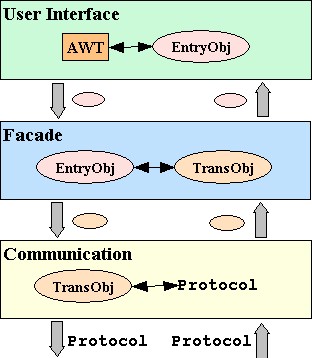
Layer Interactions
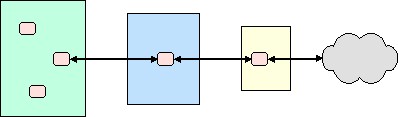
Motivation
Single-Threaded Applet
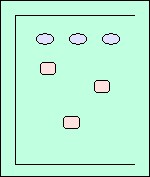
Applet With Two Threads
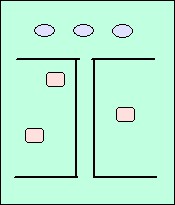
Layer Interactions With Double-Threaded Applet
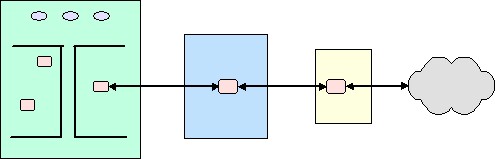
Layer Interactions With Double-Threaded Applet: Specifics
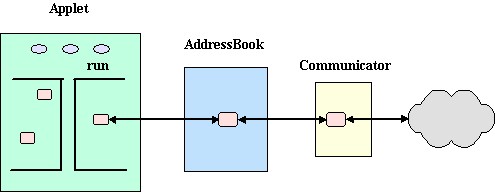
Implementation
The strategy followed in this implementation is the following
- make the applet, itself, Runnable
- create a new Thread, designating itself as the target (the object whose run method will be called)
- create an infinite loop in the run method in which the thread sleeps for a brief period (e.g., one-half second), wakes up and checks a variable, and, if the variable has a valid value, processes that value
- in other parts of the program, user events are processed, such as processing button events, closing the window, and setting the value to be checked by the run method
Key segments of code that illustrate this implementation strategy follow.
Applet
public class ABApplet extends Applet
implements ActionListener, WindowListener, Runnable {
Key Variables
private Frame outerBox;

private Thread threadProcessAction;
private int delay = 500;

private String lastAction;
private EntryObj lastEntryObj;
init()
public void init() {

     super.init();

     buildUI();

     addressBook = new AddressBook();

     lastAction = null;
     threadProcessAction = new Thread ( this );
     threadProcessAction.start();

}  // end init
actionAdd()
public void actionAdd() {

     lastAction = new String ( "add" );
     lastEntryObj  = getDisplayData();

}  // end lastAction
run()
public void run() {

     while ( true )  {

          try  {
               Thread.sleep ( delay );

               if ( lastAction != null )  {
                    actionObj.wait();
                    if ( lastAction.equals("add") && lastEntryObj != null ) {
                         setDisplayData ( addressBook.add ( lastEntryObj ) );
                    }  // end add test
                    if ( lastAction.equals("delete") && lastEntryObj != null ) {
                         setDisplayData ( addressBook.delete ( lastEntryObj ) );
                    }  // end delete test
	            lastAction = null;
               }  // end if

          }  catch ( InterruptedException except)  {
          }  // end catch

     }  // end while

}  // end run
Alternative Implementation
A weakness in the first strategy is that the run method consumes unnecessary cycles and it goes through its loop, sleeping, waking up, checking for an (unlikely) set of conditions, and only occasionally doing anything useful.
A better strategy would have the run cycle pause until it is notified that the user has does something that requires its processing, such as entering data and pressing a button (e.g., "add).
The strategy followed in this implementation is the following
- make the applet, itself, Runnable
- define a new class and create an instance of it to hold the data involved in processing a user's action (e.g., the "add" method called for and the entry data)
- create a new Thread, designating itself as the target (the object whose run method will be called)
- synchronize in the run method on the object instantiated to hold the action data and then wait
- in other parts of the program, as part of processing a user event, such as an add button pressed, synchronize on the action object, set its variables (e.g., method = "add" and data = entry_data), and issue a notify
Key segments of code that illustrate this implementation strategy follow.
Key Variables
private ActionObj actionObj;init()
public void init() {

	super.init();

	buildUI();
	addressBook = new AddressBook();

	actionObj = new ActionObj();
	threadProcessAction = new Thread ( this );
	threadProcessAction.start();

}
actionAdd()
public void actionAdd() {

     synchronized ( actionObj )  {

          actionObj.setLastAction ( "add" );
          actionObj.setLastEntry ( getDisplayData() );
          actionObj.notifyAll();

     }  // end synchronized

}  // end lastAction
run()
public void run() {

     while ( true )  {

          try  {
               synchronized ( actionObj )  {

                    actionObj.wait();

                    if ( (actionObj.getLastAction()).equals("add") && (actionObj.getLastEntry()) != null ) {
                         setDisplayData ( addressBook.add ( actionObj.getLastEntry() ) );
                    }  // end add test

                    if ( (actionObj.getLastAction()).equals("delete") && (actionObj.getLastEntry()) != null ) {
                         setDisplayData ( addressBook.delete ( actionObj.getLastEntry() ) );
                    }  // end delete test

               }  // end synchronized

          }  catch ( InterruptedException except)  {
          }  // end catch

     }  // end while

}  // end run