
Due: November 6 at 11:59 p.m.
In this lab, you will build a 32-bit arithmetic logic unit (ALU) in Digital. Your ALU will perform arithmetic, bitwise logic, shifts, and signed comparisons for our RISC-V processor. You will reuse it in Lab 4, when you build a CPU.
Build and test the Boolean, shifter, add/sub, and SLT sub-units in
Exercises 1–4. In Exercise 5, connect them to a single
ALUOp control input to complete the ALU.
You can accept the assignment on classroom50 here.
Once the assignment is released, accept it and clone your repository. Open the starter circuits directly in Digital. They contain named input/output pins and a green Test block; you will build the logic and wiring.
Keep these supplied circuit files together in your Lab 3 folder:
boolean-unit.digbidirectional-shifter.digadd-sub-unit.digslt-unit.digalu.digYou may move the supplied pins, but do not change their names or widths. Save each sub-unit before inserting it into another circuit using Components → Custom. All data inputs and results are 32 bits unless otherwise specified; control signals and flags have their own widths.
The final circuit, alu.dig, has inputs A
(32 bits), B (32 bits), and ALUOp (4 bits),
and outputs Result (32 bits) and FlagZ (1
bit).
ALUOp |
Operation | Result |
|---|---|---|
0000 |
AND | Bitwise A AND B |
0001 |
OR | Bitwise A OR B |
0010 |
ADD | A + B |
0011 |
XOR | Bitwise A XOR B |
0100 |
SLL | A shifted left by B[4:0], filling with zeros |
0101 |
SRL | A shifted right by B[4:0], filling with zeros |
0110 |
SUB | A − B |
0111 |
SLT | 1 if signed A < signed B; otherwise 0 |
1000 |
SRA | A shifted right by B[4:0], copying A’s sign bit |
Operation codes are binary. Keep only the low 32 bits of arithmetic results. Signed values use two’s complement. For shifts, A is the value being shifted and B supplies the shift amount; only the lowest five bits of B are used.
These ALUOp codes are our course’s internal control
signals, not RISC-V instruction opcodes. In Lab 4, your CPU control unit
will generate them. The remaining ALUOp codes are not
tested.
Deliverable: boolean-unit.dig
Implement bitwise AND, OR, and XOR using logic gates and a mux.
| Pin | Direction | Width | Meaning |
|---|---|---|---|
A, B |
Input | 32 | Operands |
Bool |
Input | 2 | 00: AND; 01: OR; 10: XOR |
Out |
Output | 32 | Selected Boolean result |
The 11 selector value is not tested. Set gates and mux
data paths to 32 Data Bits. The mux selector is
2 bits, not 32 bits.
Connect A and B to each of the three logic gates, then use a mux to
choose which gate’s result reaches Out. Right-click a
component to change its Data Bits. For the mux, set
Number of Selector Bits to match Bool.
Think about which mux input is selected by each Bool
value. Connect the unused input to a 32-bit constant 0 so it is not left
floating.
Test each operation before moving on. Use operands with a mixture of zeros and ones so that AND, OR, and XOR produce different results.
If Digital reports “There are one bits needed, but 32 bits found,” check the widths at that connection. Data paths are 32 bits; selectors and flags use the smaller widths in the interface tables. Constants must also match the width of the wires they drive.
Deliverable:
bidirectional-shifter.dig
| Pin | Direction | Width | Meaning |
|---|---|---|---|
A, B |
Input | 32 | Value and shift amount, respectively |
ShiftOp |
Input | 2 | 00: SLL; 01: SRL; 10:
SRA |
Out |
Output | 32 | Selected shift result |
Use three Barrel shifter components, available under
Components → Arithmetic, and a mux. Set each shifter’s
data width to 32 bits. Configure one for logical left shift, one for
logical right shift, and one for arithmetic right shift. Do not use
rotation. The 11 selector value is not tested.
Connect A to the shifters’ data inputs. Use a splitter to extract B[4:0] for the shift amount. Configure the shift amount as unsigned. If your Digital version expects a wider shift input, zero-extend these five bits to the required width; do not include higher bits of B.
Right-click each shifter to set its Direction and Mode, and give it a label identifying its operation. In the settings shown below, change Data Bits to 32 and leave shift input has sign unchecked. That setting concerns the shift amount; arithmetic right shift still copies the sign bit of A.
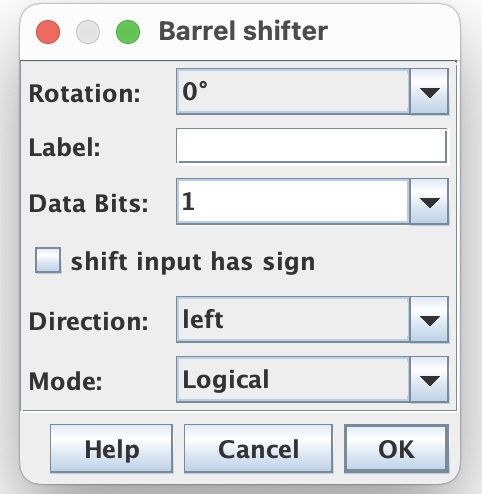
Connect the three results to a mux controlled by
ShiftOp. Connect the unused mux input to a 32-bit constant
0.
Test shift amounts 0, 1, and 31. Also test a value with its most significant bit set: SRL and SRA should produce different results when shifting it right.
Deliverable: add-sub-unit.dig
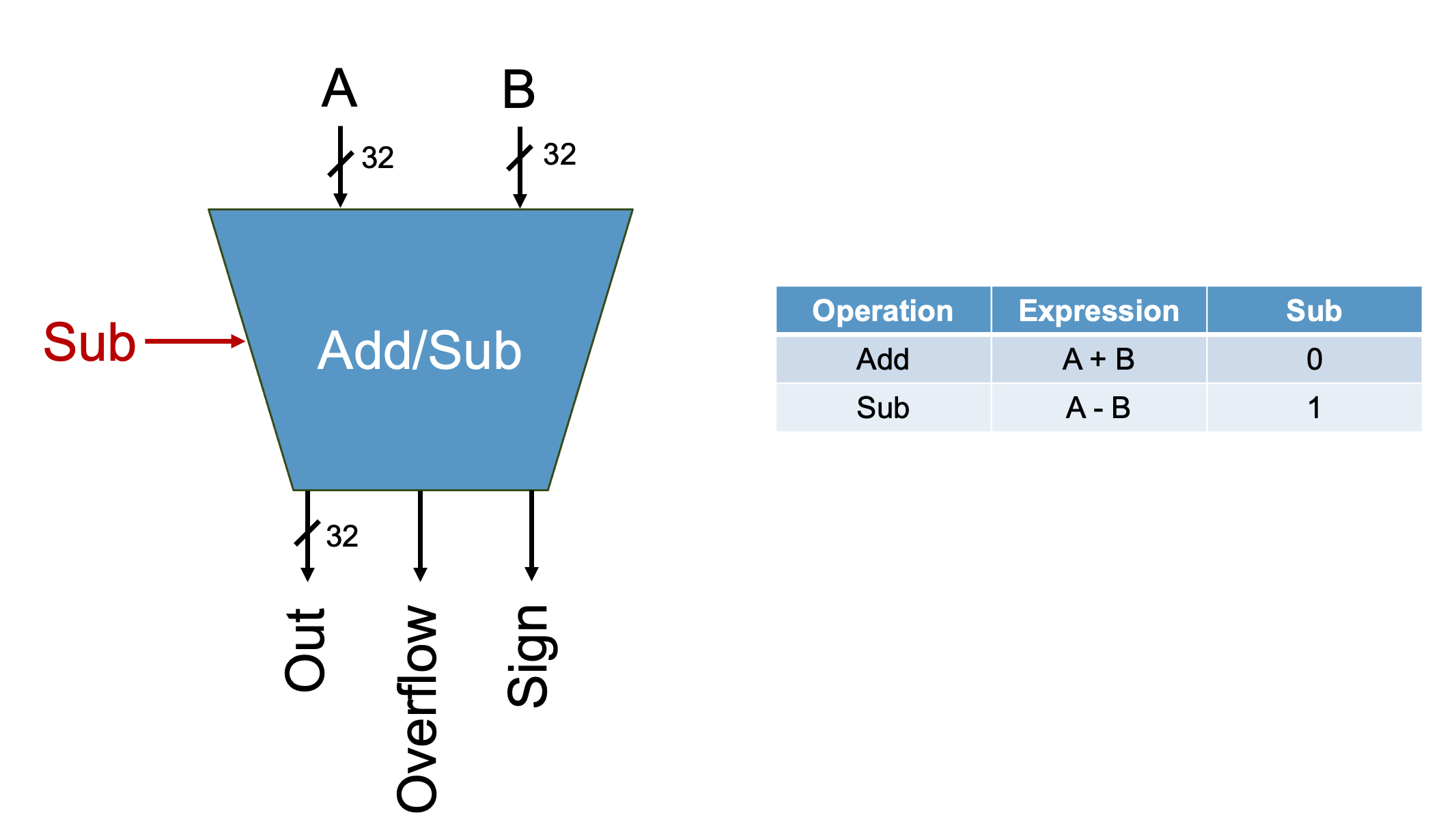
| Pin | Direction | Width | Meaning |
|---|---|---|---|
A, B |
Input | 32 | Operands |
Sub |
Input | 1 | 0: addition; 1: subtraction |
Out |
Output | 32 | Arithmetic result |
Sign |
Output | 1 | Most significant bit of Out |
Overflow |
Output | 1 | Signed overflow indicator |
Use a 32-bit Adder component. You may not use the Subtract component. Implement subtraction using:
A - B = A + (~B) + 1Use Sub to control whether B is inverted and whether the
initial carry-in is 1. Addition must still work when
Sub=0.
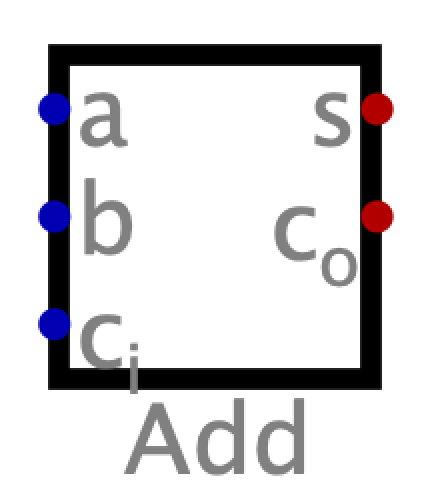
The adder’s s output supplies Out. Its
carry-in is one bit. If you use XOR gates to conditionally invert B, you
will need a 32-bit mask controlled by Sub; sign-extending
the one-bit control is one way to create that mask.
Sign is bit 31 of Out. A sign bit of 0
represents a nonnegative result, including zero. When signed overflow
occurs, the stored result does not represent the correct mathematical
answer.
Use the signs of the original A and B inputs and the stored result to detect signed overflow:
| Operation | Signed overflow occurs when |
|---|---|
| ADD | A and B have the same sign, but the result has the opposite sign |
| SUB | A and B have different signs, and the result’s sign differs from A’s |
Derive the logic for Overflow, including the
Sub control. A carry-out alone does not indicate signed
overflow.
Use this truth table to work out the two cases before combining them
with Sub:
| A[31] | B[31] | Out[31] | Overflow when Sub=0 | Overflow when Sub=1 |
|---|---|---|---|---|
| 0 | 0 | 0 | ||
| 0 | 0 | 1 | ||
| 0 | 1 | 0 | ||
| 0 | 1 | 1 | ||
| 1 | 0 | 0 | ||
| 1 | 0 | 1 | ||
| 1 | 1 | 0 | ||
| 1 | 1 | 1 |
Out.Out for both
operations.Sign.Overflow.Include these checks (values are hexadecimal):
| A | B | Sub | Out | Sign | Overflow |
|---|---|---|---|---|---|
00000004 |
00000005 |
0 | 00000009 |
0 | 0 |
7FFFFFFF |
00000001 |
0 | 80000000 |
1 | 1 |
00000003 |
00000001 |
1 | 00000002 |
0 | 0 |
80000000 |
00000001 |
1 | 7FFFFFFF |
0 | 1 |
00000000 |
80000000 |
1 | 80000000 |
1 | 1 |
Deliverable: slt-unit.dig
The SLT unit takes one-bit inputs named Sign and
Overflow from the add/sub unit and produces a one-bit
output named Out. For SLT, the add/sub unit must compute
A − B.
A negative subtraction result usually means A < B, but overflow can reverse the stored sign. Derive and implement the Boolean equation from this table:
| Overflow | Sign | Out: signed A < signed B |
|---|---|---|
| 0 | 0 | 0 |
| 0 | 1 | 1 |
| 1 | 0 | 1 |
| 1 | 1 | 0 |
Do not use Digital’s Comparator component to implement SLT. Test all four input combinations, then test it together with the add/sub unit using both ordinary and overflowing subtractions.
Deliverable: alu.dig
Combine your four sub-units using the final interface and operation table above. Use tunnels to keep the wiring readable.
Insert your saved circuits using Components →
Custom. Send A and B to the Boolean, shifter, and add/sub
units. Connect the add/sub unit’s Sign and
Overflow outputs to the SLT unit. The SLT unit uses this
subtraction result; it does not need a second subtractor.
ALUOp into the internal controls
needed by your sub-units. The Boolean and shift selectors are internal
signals; they are not extra inputs to the final ALU.00000001, and a false comparison produces
00000000 (hexadecimal).FlagZ from the selected final
Result: it is 1 exactly when Result is zero, for every
supported operation.You may use a 32-bit Comparator to check whether Result equals zero. The restriction on Comparators applies to implementing SLT.
One way to organize the final selection is a four-input, 32-bit mux:
Boolean result, shift result, arithmetic result, and zero-extended SLT
result. Derive its selector and the sub-unit controls from
ALUOp. The encodings for Bool and
ShiftOp are given in their interface tables; do not assume
the low bits of ALUOp already match them.
Check the whole path for one operation at a time: decode the
operation, verify the sub-unit output, verify the selected
Result, then check FlagZ.
Each starter circuit includes local tests in its green Test block.
Run that circuit’s test cases in Digital after implementing it. The same
tests are included as text files in the repository’s tests/
folder. Keep the supplied expected outputs unchanged; you may add your
own cases. The unfinished starter circuits will not pass until you wire
them.
Download the ALU check cases. This CSV
lists inputs and expected outputs for manual testing; it is not a
Digital test-block file. A, B, and
Result are hexadecimal, ALUOp is binary, and
FlagZ is a single bit.
Test your sub-units before testing the full ALU. The supplied cases cover every operation, signed comparisons, overflow edge cases, and shift amounts. Add your own cases as well; passing these examples alone does not establish that every input works.
Submit all five .dig files, together
with any additional custom circuit files they depend on, to the course’s
Lab 3 assignment on Gradescope. Follow the
repository/submission directions posted with the classroom50 assignment
when it is released.
Before submitting, open alu.dig from the folder you will
submit and confirm that all custom components load. Keep a working copy
for Lab 4.