Adds "Follow Up" items to
the Message and contextual menus (and optionally a toolbar
button) of Apple's Mail
application that allows you to compose (and then send)
a quoted version of the original message to all of the
original recipients, keeping the To, Cc and Bcc addresses as
they appeared in the original message. In keeping with
Mail's built-in Reply and Reply All functionality, the
plugin adds "Follow Up" (original To: recipients only) and
"Follow Up All" (all original recipients) functionality via
both menus and toolbar items.
Free. If you like
MailFollowUp please let
me know.
Screenshots
Usage
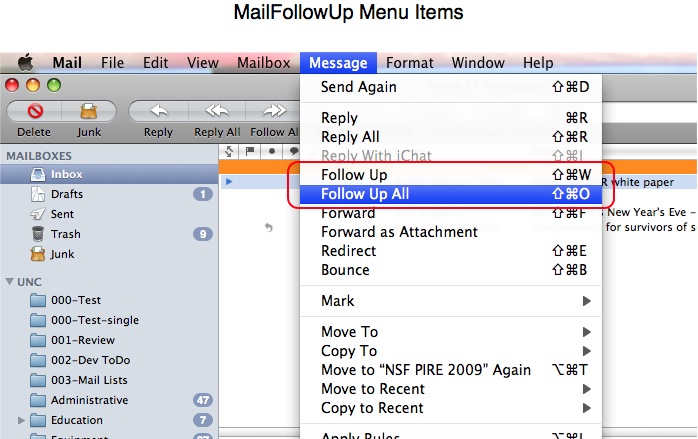
Similar to the "Reply" and "Reply All" funcionality built into
Mail, once the plugin is installed (see instructions below) you
should be able to select one or more messages and then choose
either "Follow Up" or "Follow Up All," from either the Message or
contextual menus. You can also use the keyboard shortcuts -Shift-W and -Shift-O respectively. If you
initially select a portion of the text from the body of the
original email, only that (quoted) text will appear in the
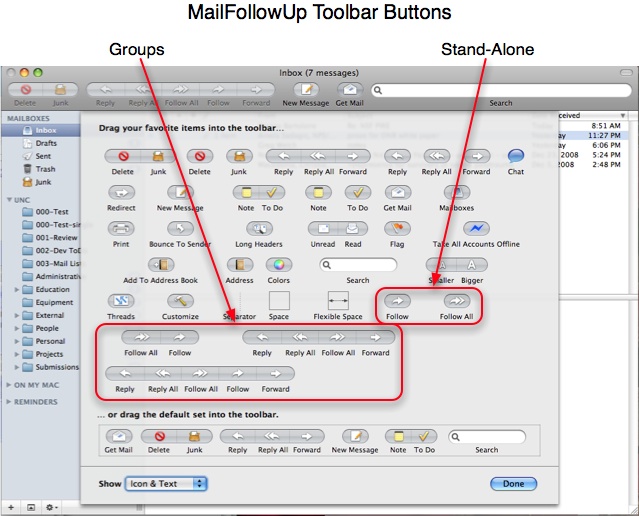
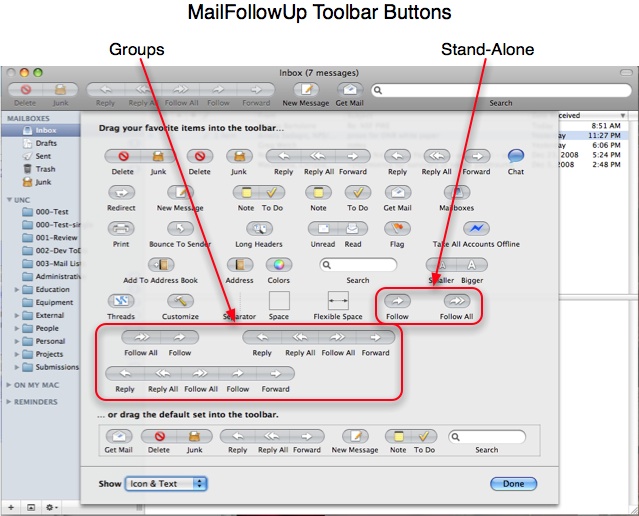
followup. Follow
Up toolbar buttons can be added via the toolbar
customization panel, either as a stand-alone "Follow" or "Follow
All" buttons, or in a various button groups.
I have long used Apple's Mail application, and have generally been
very pleased with it. However I regularly found myself wanting to
send an additional thought or comment to the original recipients
of an email message, i.e. to "follow up" on the message. The
"Reply All" option wasn't really what I wanted, because it would
put only the original sender in the To field, and everyone
else in the Cc field. This would make it seem like I was primarily
addressing the original sender, and including others simply for
their information. (Personally, I pay closer attention to mail
that is sent "To" me than mail where I am included in the "Cc"
field.)
Instead what I wanted in this case was to send a quoted "follow
up" message to the original recipients, as they appeared in the
original To, Cc, and Bcc fields. To accomplish this I usually did
a "Reply All" and then manually moved the original To recipients
from the Cc field back to the To field. This got old, and so I set
out to develop a Mail application plugin that did what I
really wanted. With some help from Scott Morrison (see below) I
was able to develop a MailFollowUp plugin. As with my MailRecent
plugin, I wrote this MailFollowUp plugin for myself, but
hope that others might find it useful too.
Installation (Manual)
You might need to provide Full Disk Access (link)
for the Terminal application to successfully use the following
commands. You should remove this elevated Terminal permission
after you have issued the commands.
Also, as of macOS 10.4.2/Mojave, Apple has
incorporated a new Mail plugin management scheme. After you
install any plugin (including mine) you must enable them from
within Mail per steps 5–9 below.
Quit the Mail application.
Download (see above), expand, and mount the MailFollowUp disk
image.
Drag MailFollowUp.mailbundle to ~/Library/Mail/Bundles/
("~"means a user's home directory). You might need to create the
Bundles folder if it does not already exist.
If you have never used another Mail bundle, you will need to
run two special commands in the Terminal application (omit the %
prompt).
In the General tab click the "Manage Plug-Ins…” button near
the bottom left.
Select (check the box for) each plugin that you want to use.
Click the "Apply and Restart Mail” button.
After Mail relaunches the plugin(s) should be available, assuming
all else is correct/well.
Un-Installing the Plugin
You might need to provide Full Disk Access (link)
for the Terminal application to successfully use the following
commands. You should remove this elevated Terminal permission
after you have issued the commands.
Quit the Mail application.
Move ~/Library/Mail/Bundles/MailFollowUp.mailbundle
to the trash.
Changing the Follow-Up Subject Prefix (Advanced)
NOTE: As of macOS 10.4/Mojave this might or
might not work for you. You might need to provide Full Disk
Access (link)
for the Terminal application to successfully use the following
commands. You should remove this elevated Terminal permission
after you have issued the commands.
By default MailFollowUp will leave the follow-up subject prefix
as "Re: " as with a normal reply. If you would like to change the
prefix to something else, for example "Follow-up: ", quit the Mail
application and then run the following command in the Terminal
application (omit the % prompt):
If you are using OS X 10.8/Mountain Lionor newer, from a command line in the Terminal
application type
To provide maximum flexibility, the string you specify will
replace all four characters of "Re: " incuding the final space.
For most people the string will likely end with ": " (a colon and
a space).
To return to the default follow-up subject prefix "Re: " as with
a normal reply, quit the Mail application and then run the
following command in the Terminal application (omit the % prompt):
If you are using OS X 10.8/Mountain Lion or newer
type
Changing the MailFollowUp Menu Text and Toolbar Labels
(Advanced)
NOTE: As of macOS 10.4/Mojave this might or
might not work for you. You might need to provide Full Disk
Access (link)
for the Terminal application to successfully use the following
commands. You should remove this elevated Terminal permission
after you have issued the commands.
If you would like to change the MailFollowUp menu item text
and/or toolbar labels to something else, for example very short
toolbar labels, quit the Mail application and then run the any (or
all) of the following commands in the Terminal application (omit
the % prompt), replacing the -string values with your desired
strings:
If you are using OS X 10.8/Mountain Lion or newer
type
To return to the default menu item text and/or toolbar labels,
quit the Mail application and then run all of the above commands as shown in the Terminal application (omit
the % prompt).
Acknowledgements
I want to thank Scott Morrison (developer of the wonderful Mail
Act-On and MailTags) for help and code snippets that
allowed me to develop both the MailFollowUp and MailRecent
plugins. Thank you to Maurice Scharf for the French web page
translation and localization help, Matthias Fichtner and Jan-Michael Frahm for
the German localization help, and Paolo Boni for the Italian
localization help.
 MailFollowUp (Mail Plugin for
Mac OS X)
MailFollowUp (Mail Plugin for
Mac OS X)

 -Shift-W and